API Documentation
- Generate a New Token
- API Prerequisites
- List All Apps
- List All Browsers
- List All Resolutions
- Report By ID
- Issues By ID
- Screenshots By ID
- Create Advanced Report
- Create New Application
- Delete Application
- Create Quick Report
- Create Screenshot
Generate a New Token
In order to generate a new token / API key there are a few prerequisite steps that must be followed first. Please be sure of the following before proceeding.
- Unlimited Plan
- In order to generate an API token and make use of the API calls you must have a current unlimited plan
- If you purchased the unlimited plan, generated a token, but then switched plans your API token will no longer work.
- You can check your current plan status from the Dashboard after logging in under My Plan
- Dashboard
- Generating new tokens can only be done from the DEVSEY dashboard
- You must be logged into your DEVSEY account and have the unlimited plan
Once you've checked all the prerequisites you can generate a new token from the dashboard.

For reference the steps required are:
- Sign into https://devsey.com
- Click Dashboard from the top right menu
- Verify you are currently an unlimited plan member by clicking My Plan
- Next to My Plan click Dashboard to take you back to your main dashboard
- Scroll down to API Access
- Click the green Generate Key button
- To the left of the green Generate Key button you will see Your API Token, and below that your new API Token
- Click the token, it is a hyperlink, it will automatically copy the token to your clipboard.
API Prerequisites
After generating your API token you are ready to start making API calls and communicating with our service. We recommend reading this page before starting and understanding limitations of our service as well as what is to be expected. We will also outline some useful methods and tools that should assist you with making our API service work with your usage.
Methods
- POST
- GET
We make use of POST and GET calls for our API services. If you are unfamiliar with what POST and GET is then we recommend reading this resource and getting more familiarized with them. The reason for the two different usages are as follows.
Our service makes use of POST calls to insert new records, or to return back records based on a filtered query. For example you can use our app-create API call to create a new application record on DEVSEY. In that situation you would POST the application URL as a string. We also use POST for filtered queries, for example you could make use of the report-view-by-id API to view a specific report by application ID.
Our service makes use of GET calls to return lists. Some of our filtered queries have acceptable values. Our GET APIs will return those lists that you can make use of. They do not require any additional input or filtering; they are just the full list. Therefore, they do not require any submitted information from your application. For example, when you make a call to our app-view API it will return all of your applications that are stored on DEVSEY. It already knows which applications belong to you based on your API Token, therefore nothing needs to be submitted for this return.
Return
- JSON (JavaScript Object Notation)
- SUCCESS: 200 or 201 or 202
- ERROR: 400 or 404 or 403 or 500
Our service returns back JSON (JavaScript Object Notation). If you are unfamiliar with JSON we recommend reading this resource and better familiarizing yourself with it. In short JSON is similar to an array; there are keys and there are values. As you go through the documentation for each API service we will define what each key is and the data type to expect as the value. It is up to you and your application on how you decide to parse that information. Many languages have built in functions for decoding it, and looping through it. For example PHP has json_decode / json_encode. Depending on what language your application is written in, I would check the documentation for that language. Below is an example of a JSON return from DEVSEY, upon a successful call this is the type of return to expect.
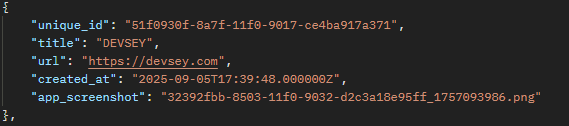
In the event of a successful RETURN you should expect back an HTTP status code of 200 or in some cases 201 or 202. It is not necessarily required for you to understand what all the HTTP status codes are but they do assist in making a fully functional application. If you are unfamiliar with HTTP status codes we recommend reading this resource.
Failed calls or returns will most likely show 400, 404, 405, or 500. If you receive one of these error codes back it doesn't necessarily mean that your code is incorrect. It is possible that our service or API service is down for the moment. Before evaluating your code for mistakes we do recommend checking our status page first. If you scroll to the bottom you can check our real time status graph to determine if our site services are up or down.
If our service is currently up and running and you are getting failed returns, then we recommend validating that you have the correct information required in the call, and that there are no mistakes in your application code.
Code Language
We do not have any restrictions for coding languages. As long as your application can make POST and GET calls, and receive JSON back. It is important to note that whatever language you choose should also be able to pass HEADERS with the request call. Our API service makes use of the Authorization header for your API Tokens, and the Accept header for application/json.
There are plenty of coding languages to choose from and because of that we unfortunately cannot assist you with writing your application or calls. Any examples we provide will most likely be in a singular language.
Headers
Our application makes use of two headers when making a POST or GET call. We use Authorization and Accept. Authorization must be followed by your API Token. Accept must be followed by application/json.
Testing Resources
We recommend Postman. Postman has both paid and free services for allowing you to test your API GET and POST calls to our service. This is not required but it can make the process easier to test our calls before implementing them into your project.
List All Apps
/app-view
- API: https://devsey.com/api/app-view
- METHOD: GET
HEADER
POST Variables
- NONE
GET Variables
- NONE
RETURN
- unique_id: string
- /report-view-by-id
- app_id
- /report-advanced-create
- app_id
- /app-remove
- app_id
- /report-view-by-id
- title: string
- url: string
- created_at: timestamp
- app_screenshot: string
- You can pair the app_screenshot return value with our url to view the images: https://devsey.com/storage/
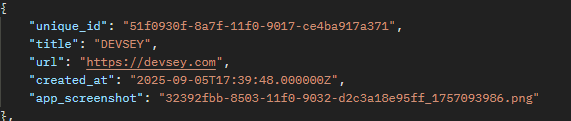
Additional Information:
The unique_id return from this API can be used on other APIs: /report-view-by-id, /report-advanced-create, /app-remove. In order for those three APIs to successfully complete you must have the app_id (unique_id). This means that you would need to run the /app-view API first in order to get the app_id (unique_id) you wish to make reports or screenshots for. The return section above describes what variables the unique_id can be used for.
List All Browsers
/browsers-view
- API: https://devsey.com/api/browsers-view
- METHOD: GET
HEADER
POST Variables
- NONE
GET Variables
- NONE
RETURN
-
- id: int
- /screenshots-create
- app_browser
- /report-advanced-create
- app_browser
- /screenshots-create
- browser: string
- browser_name: string
- id: int
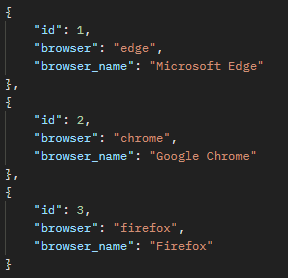
Additional Information:
The list all browsers API should be paired with the /screenshots-create and /report-advanced-create APIs. Those two APIs require the browser ID in order to successfully complete. There are a number of ways you can design your application to make use of this, we recommend storing our bowser list on your own service so that you do not need to call our service every time you want to add a new screenshot or create an advanced report through our API but that method is not required. Localizing the resources for your own application can make it faster (require less calls to us an outside source) and cut down on unnecessary API calls.
The return section above describes where the id value pairs to for the other APIs.
List All Resolutions
/resolutions-view
- API: https://devsey.com/api/resolutions-view
- METHOD: GET
HEADER
POST Variables
- NONE
GET Variables
- NONE
RETURN
-
- id: int
- /screenshots-create
- app_resolution
- /report-advanced-create
- app_resolution
- /screenshots-create
- type: string
- width: int
- height: int
- id: int
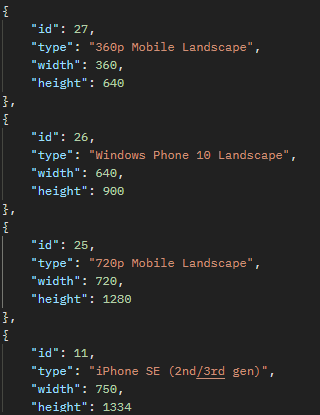
Additional Information:
The list all resolutions API should be paired with the /screenshots-create and /report-advanced-create APIs. Those two APIs require the resolution ID in order to successfully complete. There are a number of ways you can design your application to make use of this, we recommend storing our resolution list on your own source so that you do not need to call our service every time you want to add a new screenshot or create an advanced report through our API but that method is not required. Localizing the resources for your own application can make it faster (require less calls to us an outside source) and cut down on unnecessary API calls.
The return section above describes where the id value pairs to for the other APIs.
Report By ID
/report-view-by-id/{id}
- API: https://devsey.com/api/report-view-by-id/{id}
- METHOD: GET
HEADER
POST Variables
- NONE
GET Variables
- id
- unique_id
- /app-view
RETURN
-
- unique_id: string
- /screenshots-view-by-id/{id}
- {id}
- /issues-view-by-id/{id}
- {id}
- /screenshots-view-by-id/{id}
- test_url: string
- test_html: string
- created_at: timestamp
- app_screenshot: string
- unique_id: string


Additional Information:
The report by id API should be paired with the /screenshots-view-by-id and /issues-view-by-id APIs. Those two APIs require the report unique_id in order to successfully complete.
The return section above describes where the id value pairs to for the other APIs.
This is a GET API so the report id must be included in the API URL without the {} brackets. The final API URL would look similar to https://devsey.com/api/report-view-by-id/yourunqiueid
Issues By ID
/issues-view-by-id/{id}
- API: https://devsey.com/api/issues-view-by-id/{id}
- METHOD: GET
HEADER
POST Variables
- NONE
GET Variables
- id
- unique_id
- /report-view-by-id/{id}
RETURN
-
- issue_line: string
- issue_extract: string
- issue: string
- created_at: timestamp
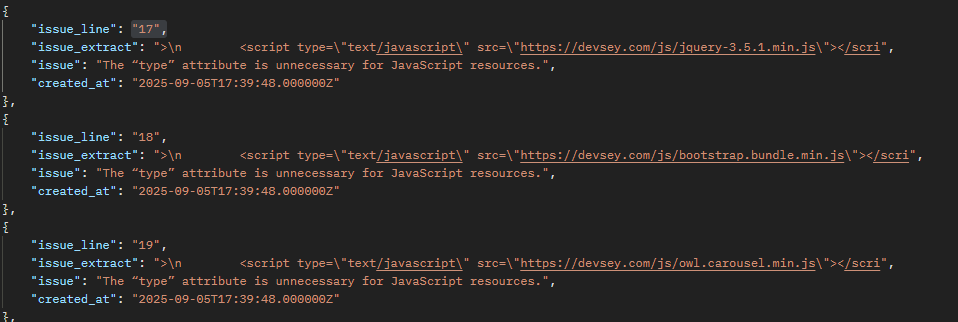
Additional Information:
This is a GET API so the report id must be included in the API URL without the {} brackets. The final API URL would look similar to https://devsey.com/api/issues-view-by-id/yourunqiueid
Screenshots By ID
/screenshots-view-by-id/{id}
- API: https://devsey.com/api/screenshots-view-by-id/{id}
- METHOD: GET
HEADER
POST Variables
- NONE
GET Variables
- id
- unique_id
- /report-view-by-id/{id}
RETURN
-
- screenshot: string
- created_at: timestamp
- You can pair the app_screenshot return value with our url to view the images: https://devsey.com/storage/
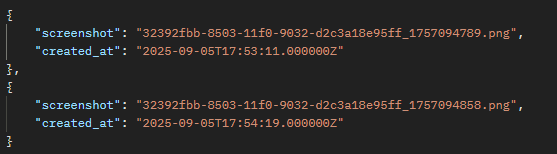
Additional Information:
This is a GET API so the report id must be included in the API URL without the {} brackets. The final API URL would look similar to https://devsey.com/api/screenshots-view-by-id/yourunqiueid
Create Advanced Report
/report-advanced-create
- API: https://devsey.com/api/report-advanced-create
- METHOD: POST
HEADER
POST Variables
- app_id
- STRING
- /app-view
- unique_id
- app_browser
- INT
- /browser-view
- id
- app_resolution
- INT
- /resolutions-view
- id
- app_url
- STRING
- MUST CONTAIN THE MAIN DOMAIN FROM YOUR APPLICATION
- app_sleeper
- INT
- Lowest Value 0
- Highest Value 5
- Adds second counter to screenshot process. 0 seconds lowest value, 5 seconds highest value.
- Can accept 0, 1, 2, 3, 4, or 5 (But only one choice)
GET Variables
- NONE
RETURN
- message: "Advanced report created successfully!"
- report_id: {unique_id}

Create New Application
/app-create
- API: https://devsey.com/api/app-create
- METHOD: POST
HEADER
POST Variables
- siteurl
- STRING
GET Variables
- NONE
RETURN
- message: "App created successfully!"
- app_id: {unique_id}
Delete Application
/app-remove
- API: https://devsey.com/api/app-remove
- METHOD: POST
HEADER
POST Variables
- app_id
- STRING
- /app-view
- unique_id
GET Variables
- NONE
RETURN
- message: "Advanced removed successfully!"
Create Quick Report
/report-create
- API: https://devsey.com/api/report-create
- METHOD: POST
HEADER
POST Variables
- app_id
- STRING
- /app-view
- unique_id
GET Variables
- NONE
RETURN
- message: "Quick report created successfully!"
- report_id: {unique_id}
Create Screenshot
/screenshots-create
- API: https://devsey.com/api/screenshots-create
- METHOD: POST
HEADER
POST Variables
- report_id
- STRING
- /report-view-by-id/{id}
- unique_id
- app_browser
- INT
- /browser-view
- id
- app_resolution
- INT
- /resolutions-view
- id
- app_url
- STRING
- MUST CONTAIN THE MAIN DOMAIN FROM YOUR APPLICATION
- app_sleeper
- INT
- Lowest Value 0
- Highest Value 5
- Adds second counter to screenshot process. 0 seconds lowest value, 5 seconds highest value.
- Can accept 0, 1, 2, 3, 4, or 5 (But only one choice)
RETURN
- message: "Screenshot created successfully!"
- screenshot: {screenshot}